Is Face Anonymization AI? Not the Kind You're Thinking Of
Yes, but not the ChatGPT kind. Face anonymization uses computer-vision models for one job: changing the face in a photo or video you made. Here’s how it works.
- face-anonymization
- ai-disclosure
- creator-privacy
Yes, in the textbook sense, but not the kind most people mean when they say "AI." Face anonymization doesn't chat, write captions, make up pictures from a typed request or carry out tasks on its own, and it's not the kind of AI that's threatening to steal our jobs. It's computer vision: models that find the face in a photo or video you made and redraw it as a different face, while the rest of the frame stays as you filmed it. Without your footage, it has nothing to work on.
What do people mean by "AI" today?
Until recently, "AI" mostly meant chatbots and image generators. You typed a request, and the tool wrote an essay, answered a question or produced a picture of something that was never photographed.
In 2026 it means much more. AI agents take a goal, plan the steps and carry them out on a computer by themselves: researching, writing, coding, filling in forms and sending messages, often for long stretches without a person checking each step. That's the kind of AI that could replace a lot of human work, and it's why so many people see AI as a threat to their jobs.
That's where most of the anger comes from. Feeds fill up with generated filler, artists and writers see tools that imitate their work, anyone can end up in a picture they never posed for, and people watch software take over tasks that used to be someone's job. When viewers see an AI label or hear that a creator "uses AI," that's what they picture.
Face anonymization gets lumped in with all of it because it also uses machine learning. The job it does is much smaller, and it starts from content a person made.
What does face anonymization do?
A face anonymization tool works on one file at a time: a photo or video you give it. Tools differ in the details, but the job breaks down into four steps. Here's how NeoFace does it once you've uploaded a photo or prerecorded video and chosen a persona, one of the faces it suggests:
- Find the face. A detection model locates the face in the photo, or in each frame of the video, and lines it up.
- Redraw it. A diffusion model draws a different face in that spot. It's guided by the persona you chose, not by text, and it follows your head position, expression and lighting.
- Outline the new face. A second model marks which pixels are face (skin, eyes, brows, nose, mouth) and which are hair, clothes or background.
- Blend it back. Only the face pixels go into your original frame. Your hair, clothes and background come from your file, and a processed video keeps its original audio.
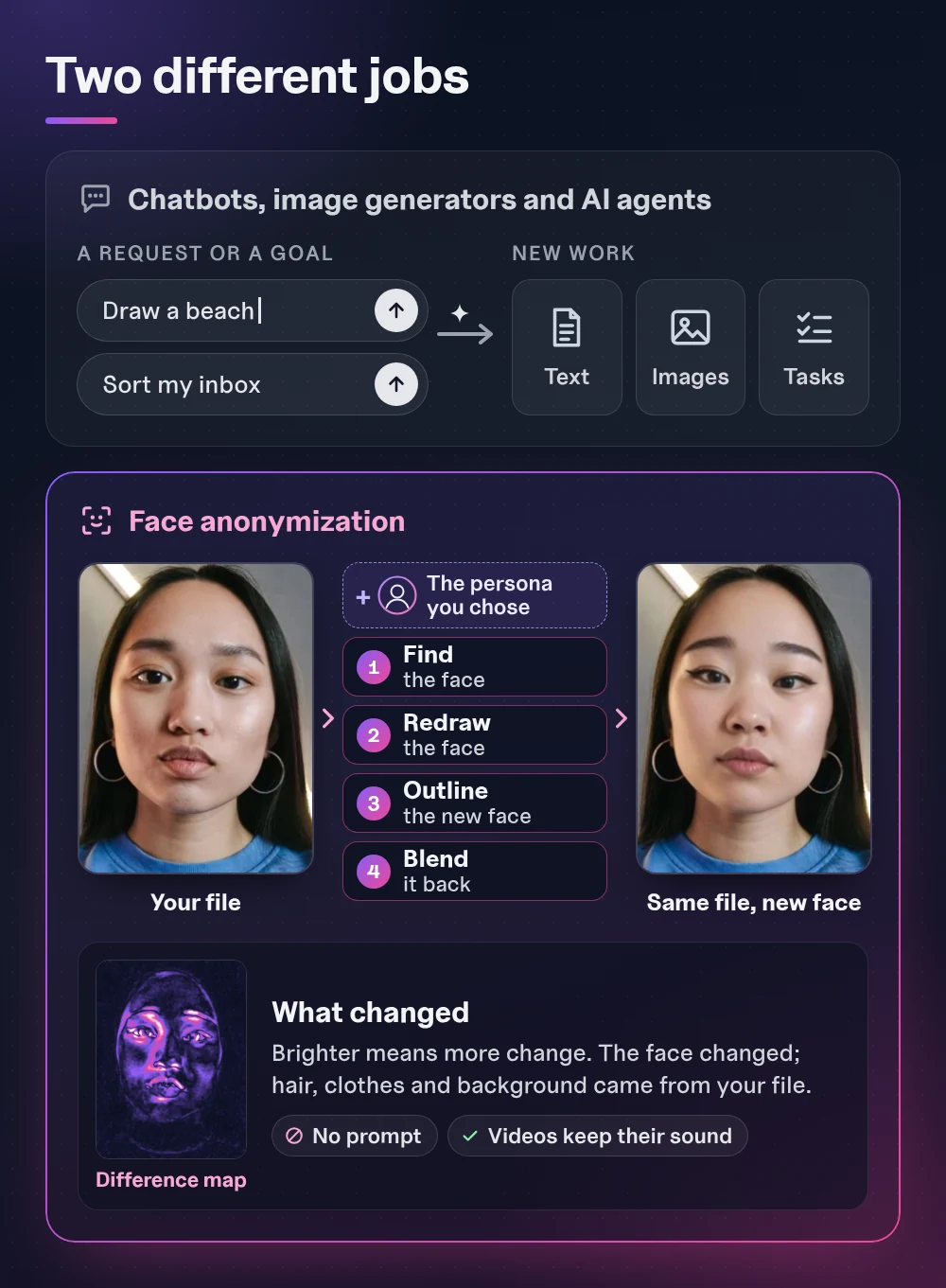
There's no prompt box anywhere in that process. The models get your file and the persona you picked, and that's all. You can't ask them for a caption, a new background or a different outfit, because they were built for this one job. The NeoFace walkthrough shows the steps from upload to download.
| Chatbots, image generators and AI agents | Face anonymization | |
|---|---|---|
| What you give it | A written request or a goal | Your photo or video, plus the persona you chose |
| What comes out | New text, images or finished tasks | Your file, with a different face |
| What it's built for | Almost any request | Changing the face in your file |
| Who makes the content | The tool | You |
| Works without your footage | Yes | No |
| May need an AI label | Yes | Yes, for realistic face changes |
Is it AI, machine learning or computer vision?
All three labels fit, and they sit inside each other. AI is the umbrella term for software that does things we used to think needed a person. Machine learning is the usual way to build it today: instead of writing rules by hand, you train a model on examples. Computer vision is the part of the field that works with images and video.
Face anonymization belongs in computer vision. The models that find and outline the face are convolutional neural networks, a design that goes back to the late 1980s. By the late 1990s, a check-reading system built on them was reading several million checks a day, and they've been the standard tool for recognizing things in images since the early 2010s. Your phone relies on the same kind of model: Apple moved the iPhone's face detection to a deep convolutional network in iOS 10.
If you've used a face filter on Snapchat, Instagram or TikTok, you've used a close relative. A filter also has to find and track your face before it can draw ears, a visor or a cartoon character on top. Face anonymization uses the same first steps, then redraws the face itself instead of covering it. The AR face filter guide explains why a live filter works better as a creative effect than as privacy protection.
So "AI" is accurate, the same way it's accurate for the face detection on your phone or a filter's face tracking. It just isn't the all-knowing, agentic, human-replacing kind.
Where does diffusion come in?
The redraw step uses a diffusion model, and it's fair to say so: diffusion is the technique behind many of today's image generators. The idea was first published in 2015 and became practical for realistic images around 2020.
The difference is in what the model gets and what it's allowed to change. An image generator starts from a written request and produces a whole picture. In the four steps above, the diffusion model starts from your frame and the persona you chose, with no words involved, and only the face pixels it draws, marked in step three, make it into your file. The result is a changed face in a picture you took.
What can't face anonymization change?
Because it only touches the face, everything else in your file stays exactly as recognizable as it was. That's the flip side of a narrow tool, and it matters for privacy:
- Your voice. A processed video keeps its original audio. If people could know you by your voice, you need a separate decision about speaking, captions or a voice changer.
- Your body and surroundings. Tattoos, birthmarks, jewelry, a distinctive room or a view from a window come through untouched.
- How well the face holds up. Results vary with lighting, angles and movement, so check the whole clip, not only the first frame.
The model changes the face and leaves the rest of your content alone, so the rest is yours to check. The faceless video privacy checklist covers the rest of what to review before posting.
Is face anonymization new?
No. Researchers published a neural network that anonymizes faces in video in 2018, built to keep the action in the clip recognizable. That was four years before ChatGPT launched in November 2022, and convolutional face detection on phones is older still.
What has improved is quality. Newer models follow expression, lighting and head movement much more closely, which is what makes an anonymized face usable in everyday creator content.
Does face anonymization replace creators?
No. It can't make anything without a photo or video you made, so it doesn't write, film, perform or edit in your place. You still plan the shoot, perform and decide what to post. The tool does the job that a blur, a crop or a mask would otherwise do, except your viewers see a face instead of a gap. The goal is to empower creators, not replace them.
That's the main difference from tools built to make content for you. If you're weighing a generated presenter instead, the face anonymization vs AI avatars guide compares the two, and the AI face anonymization guide for creators covers how to test a tool on your own photos and clips.
Do you still need an AI label?
Often, yes. A narrow tool still makes a realistic change to a person's face, and YouTube and TikTok let you mark that kind of edit when you upload. The label tells viewers what changed, and you can add a short explanation of your own.
For the exact settings and a short explanation you can reuse, see the AI labels guide. If the objection you hear is that an anonymized face is "fake" or "AI slop," the guide to whether an anonymized face is dishonest answers it directly.
Answering "that's AI" comments
Some viewers will see an AI label and assume the worst. A short, plain reply usually lands better than an argument about AI in general. For example: "I film everything myself. A privacy tool changes my face, and that's the only AI in this video." Only say that if it's true. If you also use a voice changer or an AI caption writer, mention those too.
When replying to customers, keep in mind the following:
- I can say in one sentence what the tool changes (my face) and what comes from me.
- My reply matches what my bio and AI labels already say.
- I never describe my posts as "no AI" or "100% real."
- My explanation covers every AI tool I use, not only the face.
- I explain what my tool does instead of debating AI in general.
Frequently asked questions
- Is face anonymization generative AI?
- Partly. The step that redraws the face uses a diffusion model, the same family of technique many image generators use. But it doesn’t create content from a written request. It changes the face in a photo or video you made and leaves the rest of the frame as you filmed it.
- Does face anonymization use ChatGPT?
- No. ChatGPT is a chatbot. Face anonymization uses computer-vision models that find the face in your photo or video and redraw it, and those models don’t take written instructions.
- Can face anonymization make content without my photos or videos?
- No. It needs a photo or video to work on. It changes the face in that file and can’t produce a new scene, body or video by itself.
- Do I need an AI label if I only anonymize my face?
- Often, yes. An anonymized face is a realistic AI change to a person, and platforms such as YouTube and TikTok have upload settings for that kind of edit. The label tells viewers what changed. It doesn’t mean the whole post was generated.
Create with
a face you choose.
Choose a reusable synthetic face for your photos and prerecorded videos. Start with a sample to see how NeoFace fits your content.